
Phishing emails are one of the many ways that hackers try to take advantage of unsuspecting users. A phishing email is one that (sometimes) appears legitimate and urges a user to take some sort of action which either results in malware being downloaded to the device or the user’s information stolen. The name “phishing email” is derived from “fishing email”; hackers cast out these emails and hopes to reel in a victim.
Let’s go over some of the red flags that many phishing emails display. The email displayed as an example is an actual phishing email received by a university student, so it is perfect to dissect.
Was it expected?

First off, the recipient was not expecting to receive an email of this kind to begin with. This is the first red flag. Of course, it could’ve been a simple advertisement, but, if that were the case, it would’ve contained a lot more detail.
Who is the email from?

Second, this email is from outside the university’s network (this is the network the recipient was a part of), as indicated by the “External” tag by the email subject. This is another red flag.

Moving on, we have the Google account it came from. First, the profile picture is simply a black circle, which is another red flag; if this were a formal email, the sender likely would’ve had a photo of themselves for their profile picture. Alternatively, as some do not set profile pictures, it likely would’ve been either a blue silhouette or a capital letter.

Next is the name. I have hidden the individual’s first name for reasons I will explain later. Now, with a quick Google search, I have found that there are indeed individuals with this name. However, the last name “Stark” specifically could be a potential red flag. There are various characters in pop culture that have this last name, such as Tony Stark/Iron Man from the Marvel franchise or Eddard Stark, the head of House Stark from Game of Thrones. If this email is targeted towards college-age individuals, these characters would likely be well-known by this group, so the attacker may have chosen this name to invoke a sense of familiarity.

I have also hidden the individual’s email address for security reasons. It is possible that this email address was spoofed by an attacker and that the actual owner may have no idea that their account was compromised. This is also why I have chosen to hide their first name; if they are indeed a real person, I do not want to add insult to injury and make them even more of an example.

The time the email was sent (12:55AM) could also be a red flag. Of course, some people will stay up late and be doing work past midnight. Assuming that this email does indeed originate from somewhere in Iowa as it later says, this would only put them about an hour or so behind the recipient’s time zone. So, it is not unbelievable that someone would be sending out emails at close to midnight, but it is strange. Further, while it may have been midnight in Iowa, it was early morning or even afternoon in other parts of the world; if the attacker was from another country, this would explain the strange timing of the email. For them, it was sent first thing in the morning, while for the recipient, it was midnight.

We also have the subject of the email. It is very vague, and the formatting is strange. This could also serve as a red flag that this email is a phishing email.
What does the email say?
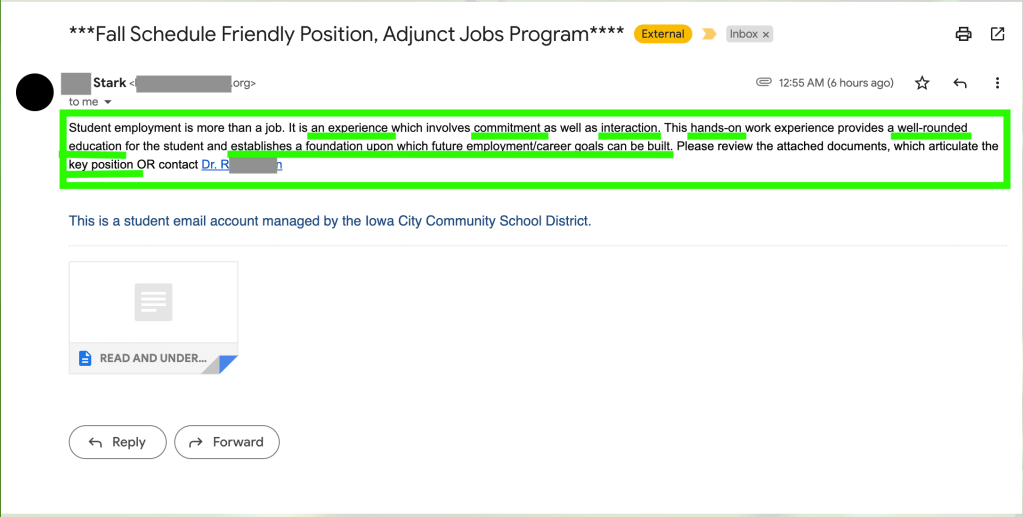
Next is the email content itself. The majority of it has little grammatical error on first glance. Spelling mistakes and poor grammar are a huge red flag for phishing emails. There is a missing punctuation mark at the end of the last sentence, which is notable. Looking over the message, it seems very generic in nature and form and contains various key words that could easily describe many jobs and careers, such as “experience”, “involves commitment”, “hands-on”, and “well-rounded education”.

Without any further context, they urge the recipient to view the attached documents which apparently give more details about this “key position”. This is another huge red flag. If this were for a real position, basic information about the position would have been in the email itself, not in an attachment. As mentioned previously, the email gives no mention to what the position actually is. This serves to stir curiosity and encourage the recipient to open the attachment.
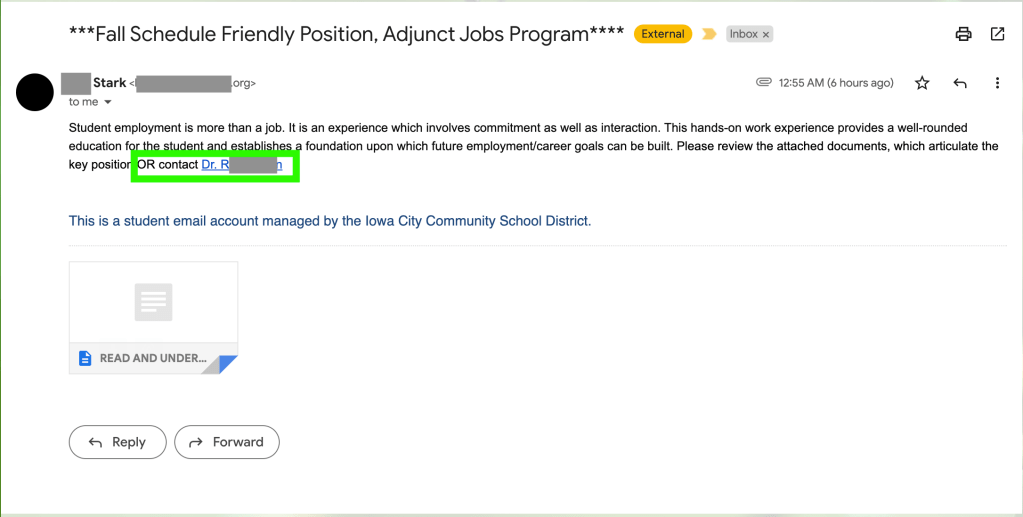
Further, they also urge the recipient to contact someone, providing a hyperlink to do so. I investigated this link and found that it does indeed contain an email address and does not, at first glance, appear to lead to a malicious website. However, there is no way to verify the authenticity of this email address. This very well may be a fake email or another compromised email on the same network. In any case, clicking on mysterious links in an email is never a good idea. Not only that, but the email address provided is for someone with the title “Doctor”. The attacker likely did this because it invokes a sense of authority and trustworthiness. People tend to trust those who have the title “Doctor” more often.
After doing a quick search on the name of this Doctor (alongside Iowa City Community School District), no information comes up, so this may be a fake person.
Another thing that is a red flag is the lack of introduction or conclusion in the email. It does not say “Dear (name)” or similar at the beginning, nor does it end with “Sincerely, (name)”. If this were a proper, formal email, the individual would have introduced themselves at some point.
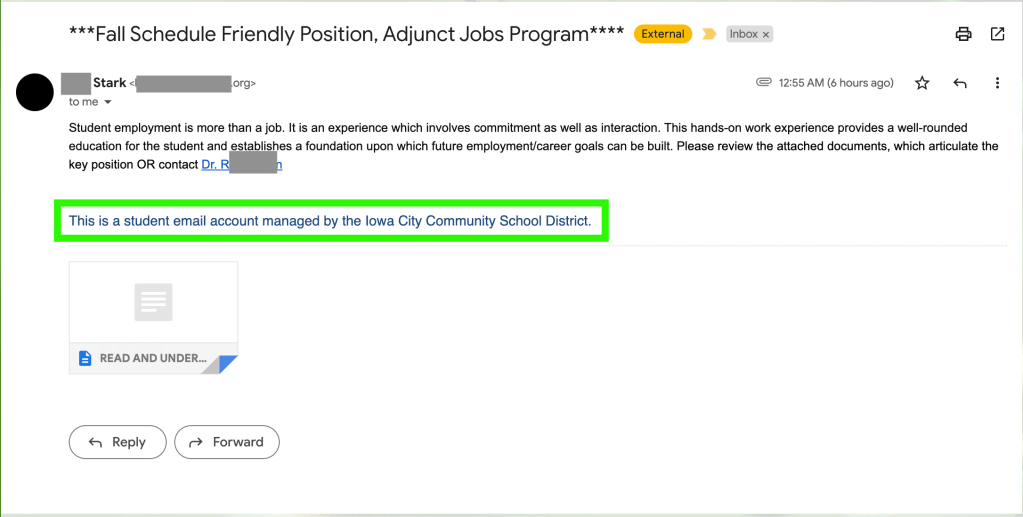
At the very end of the email, it claims that this is a “student email account” that is managed by the Iowa City Community School District. Let’s break this down. First, if this is a student account, it is strange that they would be emailing regarding student employment; it would make a little more sense for a faculty or staff member to have sent this email. Of course, it could be that the student worked for the faculty or staff member and sent it on their behalf, but I digress. I did some research on the Iowa City Community School District, and it does appear to be a real organization. However, this school district provides education from kindergarten to 12th grade. Why would someone who has yet to even graduate high school (let alone middle or elementary school) be emailing an individual regarding a student employment position? This is another red flag. Again, why would it not be a staff member sending such an email?
What about the attachment?
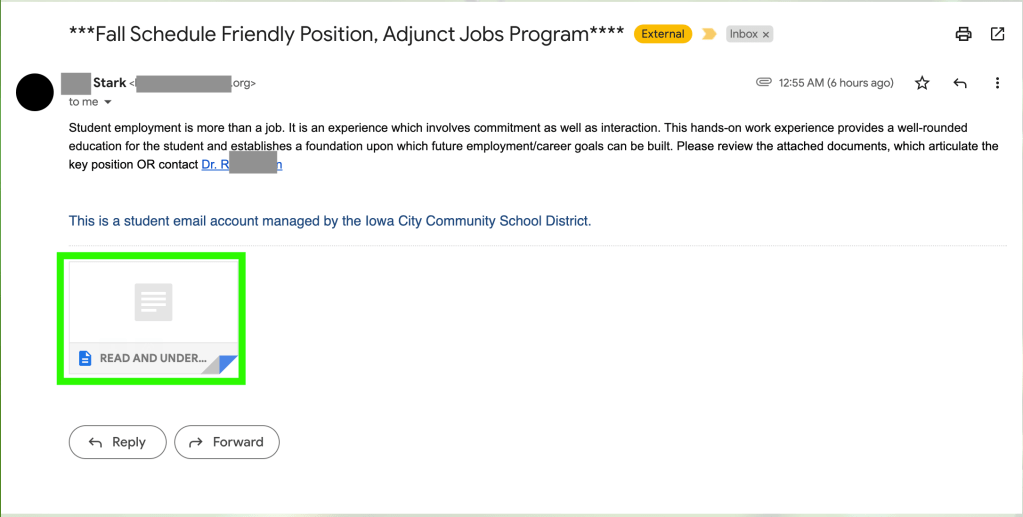
Finally, we have the email attachment: a supposed text document named “READ AND UNDERSTAND.txt”. I say supposed as it is very easy for an attacker to disguise one type of document as another. While it says it is a text file, it may actually be an executable file that runs when it is downloaded. Further, the title itself is interesting. It sounds very demanding and does not sound like it would be an official document regarding a student employment position. Going back to the previously mentioned theory that the attacker could be from another country, it is possible that they do not know English as a first language, leading to the document title sounding strange. This all serves as yet another red flag. In addition, the supposed type of document- a text document- is strange to see. Usually, if someone were to send a document, it would be a Microsoft Word Document (ending in .doc or .docx), Google Docs Document (which would link to an online document), or even a PDF file (ending in .pdf). More often than not, people do not save documents as standard .txt files.
You should never open an attachment from a suspicious email. Luckily, the author of this article has connections who were able to open the attachment safely and retrieve its contents. Read about them here!
The Author’s Theories
My first theory is that this is an actual student’s account that was compromised by a hacker, possibly by the same exact phishing email that they sent to the recipient.
It is also possible that the student themselves sent this email with malicious intent, but this is a bit less likely.
Finally, the other possibility is that this student was purposefully conducting phishing tests for some sort of assignment for a class. However, this also is unlikely since they would most likely have performed this sort of test in their own school, not with email addresses outside of their school.
Regardless of which theory (if any) is correct, this email is a phishing attempt based on the above-mentioned red flags. Luckily, Gmail has a feature that allows you to report an email as a phishing attempt, so that is what the recipient did. Further, the recipient also notified their organization’s IT department with a screenshot of the email. I would like to note that the recipient did not forward the email, and this is for good reason. When forwarding an email, any documents or files attached to the email may be opened before being sent. This defeats the purpose of not opening the suspicious attachment.
It is always better to be safe than sorry when it comes to a suspicious email. So, if you receive an email that raises any of the red flags that this one did, it may be a phishing email.
Phishing Email Checklist
This checklist can help you determine whether or not a suspicious email is a phishing email. If an email meets multiple of the below qualities, then it may be a phishing email. It is always best to err on the side of caution.
- Did you expect to receive the email?
- If you did not, then it may be a phishing email.
- Of course, sometimes unexpected emails are received.
- Is the email from outside your organization’s network?
- If it is outside your organization’s network, then it may be a phishing email.
- Do you recognize the sender?
- If you do not, then it may be a phishing email.
- If you do and have another way to contact them, try reaching out to confirm that they sent it.
- Does the sender’s name sound fake or strange?
- If it does, it may be a phishing email.
- Does the email address look like a real email?
- If it does not, it may be a phishing email.
- Keep in mind that some hackers can disguise what their email address looks like to make it appear legitimate.
- Was it sent at a strange time?
- If it was, it may be a phishing email.
- Of course, sometimes people may be working at different times of the day than you do.
- Does the subject of the email seem strange or invoke a sense of urgency?
- If so, it may be a phishing email.
- Does the content of the email make sense if it is sent by the sender?
- If it does not, it may be a phishing email.
- For example, if the email alleges to be about legal action but comes from a coffee shop’s email, it doesn’t make sense.
- Does the email contain spelling or grammar mistakes?
- If so, then it may be a phishing email.
- Does the email sound strange or contain a lot of jargon or buzzwords without clear meaning behind it?
- If so, then it may be a phishing email.
- Does the email urge you to take action on something urgent or important?
- If so, then it may be a phishing email.
- This could be clicking on a link, sending an email, or even logging in on a website.
- Does the email contain a file or attachment that is strange or suspicious?
- If so, then it may be a phishing email.
- This could be an attachment that is named strangely or even an attachment that is unexpected (for example, you wouldn’t expect someone to attach their diary to an email about marketing).



 The H.A.C.K.E.R. Project
Leave a comment