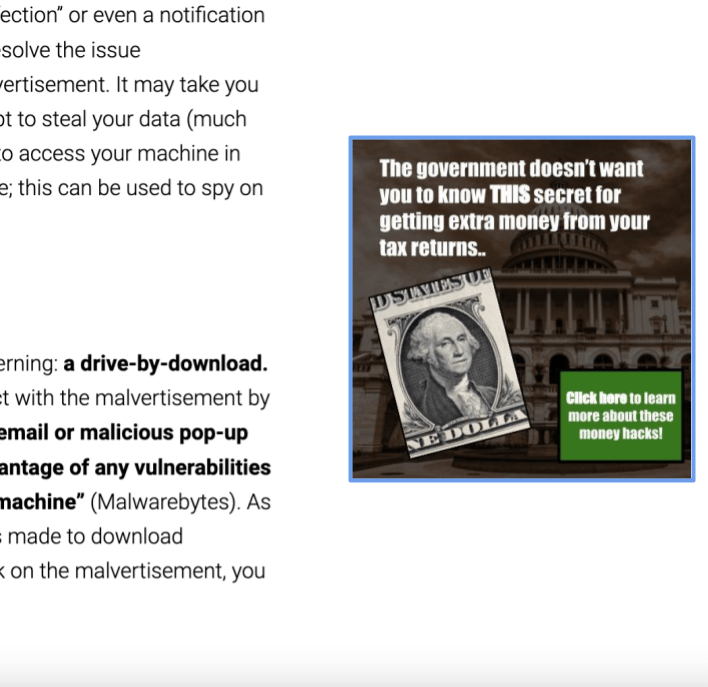

Take a look at the below image of an advertisement.

First, it is important to note that the above image was specifically created to serve as an example, and (as far as the author of this article is aware) it is not an actual advertisement. This “advertisement”, however, is quite enticing. After all, many people would enjoy receiving extra money from their government, and this ad comes across as possessing a “secret technique” that is not common knowledge. So, it is not unlikely that some people would actually click on it, especially around the gift-giving holiday season(s).
Most importantly, this image serves as a prime example of a malicious advertisement, or malvertisement.
What is a Malvertisement?
In general, malvertisement “uses what looks like legitimate online advertising to distribute malware and other threats with little to no user interaction required” (Malwarebytes). Images such as the one shown above might be displayed on websites alongside normal advertisements, tempting you to click them. Some malvertisements are a little more covert and will look nearly identical to the advertisements of a legitimate business, such as Amazon or Apple. According to Malwarebytes, “malvertising criminals rely on two main methods to infect your computer”.
Enticement and Social Engineering
The first method that Malwarebytes identified, and the method utilized by the example image above, is the use of “some kind of provocative enticement to get you to click on [the ad]”. This enticement could take the form of free money, discounts on shopping goods, dating or other intimate activities, free software, or the like. Alternatively, it could pose as an antivirus notification and appear as “a warning that you already suffer from a malware infection” or even a notification that your device is running slow, prompting you to click in order to resolve the issue (Malwarebytes). One of many things can occur if you click on a malvertisement. It may take you to a fake website and ask for your personal information in an attempt to steal your data (much like a phishing email), or it may take you to a website that attempts to access your machine in unusual ways, such as by asking to use your webcam or microphone; this can be used to spy on you or collect data from your machine without you even knowing.
Drive-By-Downloads
The second method identified by Malwarebytes is much more concerning: a drive-by-download. Essentially, drive-by-downloads do not require you to actually interact with the malvertisement by clicking; instead, “loading the web page hosting the ad (or a spam email or malicious pop-up window) redirects you to an exploit landing page, which takes advantage of any vulnerabilities in your browser or holes in your software security to access your machine” (Malwarebytes). As you “drive by” the website loading this malvertisement, an attempt is made to download malicious software onto your machine. Thus, even if you do not click on the malvertisement, you might still become infected.
How Do I Stay Safe from Malvertisements?
It is crucial to keep yourself safe from malvertisements, especially since the hackers who create malvertisements may be trying to steal “your identification data, your financial data, and your contact data, among other things. Other than outright stealing data, they can encrypt or delete information, alter or hijack core computer functions, and spy on your computer activity without your knowledge or permission” (Malwarebytes). One of the first steps to do so is to keep “your operating system, your applications, and web browsers (plug-ins included) up to date with the latest security patches” and to delete “any software (especially Flash or Java) that you don’t use or need” (Malwarebytes). Malvertisements, especially those that employ drive-by-downloads, attempt to utilize flaws in operating systems or other applications to break into your machine and cause harm. Similarly, using antivirus or antimalware software and performing regular scans can greatly increase your security against malvertisements and other types of malware (Malwarebytes).
In addition, “Enable click-to-play plugins on your web browser” (Malwarebytes). This will “keep Flash or Java from running unless you specifically tell them to”, which can help in preventing files or malware being automatically installed on your machine via drive-by-download (Malwarebytes). Alternatively, using an adblocker can help to greatly reduce the risk of malvertisement; as the name implies, an adblocker blocks a webpage from showing any advertisements “which can filter out a lot of the malvertising noise” (Malwarebytes). If no advertisements are allowed, then neither will malvertisements be allowed. Malwarebytes has identified multiple other benefits that you can receive when using an adblocker, such as “reducing the number of cookies loaded on your machine, to protecting your privacy by preventing tracking, saving bandwidth, loading pages faster, and prolonging battery life on mobile devices”.
Finally, if it seems too good to be true or even the least bit suspicious, do not click on it! Many scams rely on users clicking on something, malvertisements included. Thus, if you do not click, you keep yourself a lot safer when using your desktop computer, laptop, phone, tablet, or other device.
Resources & Further Reading
Malwarebytes. “What Is Malvertising?: How to Protect Against It.” Malwarebytes, 30 Oct. 2023, http://www.malwarebytes.com/malvertising.



 The H.A.C.K.E.R. Project
Leave a comment