
Many people have searched their name before on the web to see what results appear. Sometimes, it may return celebrities with similar (or the exact same) name, a college dean’s list that we were on a few years ago, or maybe even our social media profiles. For some, this is something fun to look at and nothing more, but others may feel that some of these results reveal a bit more about us than we would like. For example, if a Google search of your full name shows your entire street address, social security number, and/or date of birth as part of the results, you may become concerned. Luckily, Google has the Results About You tool that can help you prevent unwanted personal data from appearing in Google’s search results.
How to Use the Results About You Tool
The first step in using the Results About You tool is to “search for your full name” on Google; depending on how common or uncommon your name is, it is possible that “you may need to narrow your search (say, with your home town or city) to find results about you” (Romain).
Once you have found the result that contains your personal information and you want it to be removed, simply “tap [or click] the menu icon next to that result” which will bring up a menu that shows various pieces of data relating to this search result. This menu icon usually looks like three dots or squares in a vertical line (⋮). For example, the “about this result” menu for the Wikipedia link that appears when you search “Bing Crosby” can be seen below.
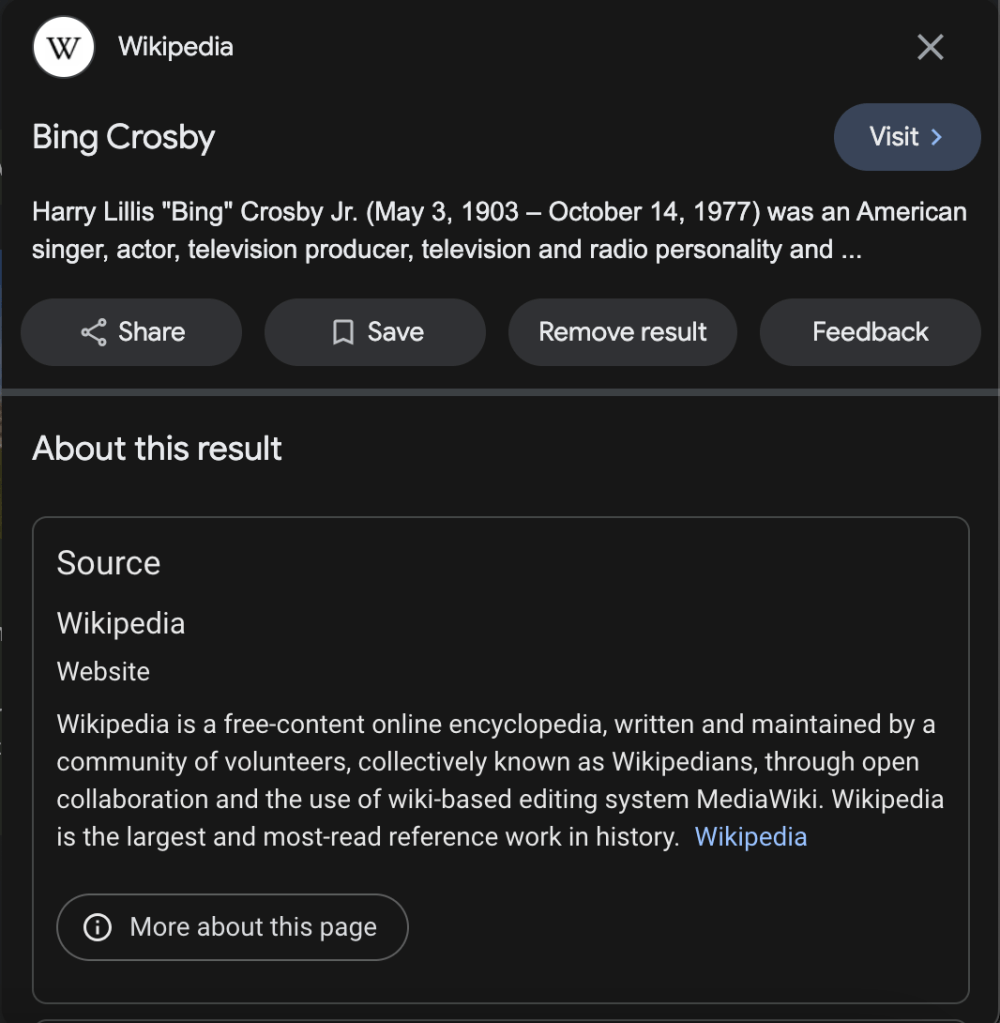
Along with various useful pieces of information, there will be a button that says “Remove result”; click or tap on this button. It will then “guide you through sending a request to have the result removed from [Google] Search” (Romain). This request will ask you why you are submitting a removal request and may require additional clarification (such as indicating what type of personally identifiable information was found in a search result).
Information that may cause a search result to be valid for removal includes:
- Confidential government identification (ID) numbers, like US Social Security Number, Argentine Single Tax Identification Number, Brazil Cadastro de pessoas Físicas, Korea Resident Registration Number, or China Resident Identity Card
- Bank account numbers
- Credit card numbers
- Images of handwritten signatures
- Images of ID docs
- Highly personal, restricted, and official records, like medical records
- Personal contact info (physical addresses, phone numbers, and email addresses)
- Confidential login credentials
Following the submission of the request, Google will review it to “make sure it meets policy requirements for removal. That includes checking to make sure the information on your request form matches what’s on the result webpage, and that the webpage isn’t owned by a government or educational institution. This usually takes a few days” (Google).
Monitoring a Request Status & Enabling Alerts
To monitor your request status, you can simply navigate to myactivity.google.com/results-about-you/. Alternatively, you can view the status of a request through the Google app. Once the app is open, “click on your profile picture to open the menu”, then “select ‘Results about you’ on the menu” (Romain).
Similarly, while on this menu, you can also enable alerts regarding search results that contain your personal data. To do this, you must enter in your personal information into the Results About You tool and select the desired notification method. Following this, you will be notified if any of the entered information appears within Google search results.
While Google cannot remove all of your information from the Internet, they promise that they are “doing everything we can to safeguard your information on Search” (Romain).
Resources & Further Reading
Google. “Remove Select Personally Identifiable Info or Doxxing Content from Google Search.” Google Search Help, Google, support.google.com/websearch/answer/9673730/. Accessed 30 Jan. 2024.
–. “Results about You.” Google Results about You, Google, myactivity.google.com/results-about-you/. Accessed 30 Jan. 2024.
Romain, Danielle. “A New Search Tool to Help Control Your Online Presence.” Google, Google, 11 May 2022, blog.google/products/search/a-new-search-tool-to-help-control-your-online-presence/.



 The H.A.C.K.E.R. Project
Leave a comment