

Have you ever written an important email (or even text message) and were hesitant to send it, even though it needs to be sent soon? If, despite checking it over dozens of times for grammar mistakes, it still seems like a challenge to finally hit that send button once you are sure it’s perfect? Alternatively, have you ever needed to send someone an email only to decide that it might be better to wait until morning? For all of these cases, as well as many others- there is an extremely useful feature that is incorporated on many of the popular email applications, as well as some text messaging applications. This feature is simply and appropriately named “Schedule Send”.
Schedule send is an easy way to delay when an email is sent but also to ensure that the email still gets sent in the first place. Simply put, when you schedule an email, you mark the day and time you want the email to be received, and then your email application handles the rest! Once the day and time arrives, the email will be automatically sent on your behalf.
This can be a great way to get around the hesitancy of sending an important email. If you think you have everything you need in your email but cannot commit to sending it, you can schedule it instead. That way, it can become an “out of sight, out of mind” item. If you think of something else to add to the email, you can simply cancel the scheduled send, edit the email as necessary, and then reschedule it. Otherwise, you no longer need to worry about pressing the send button; you just have to wait for the scheduled date and time to arrive, and the email will be sent for you!
Scheduling emails also helps when you have an email ready to send, want to send it at a later date and time, but are concerned that you may forget to send it. For example, if you need to email your boss or coworker and you know they only check their email in the morning, it might be beneficial to schedule your email to arrive just before they would normally check their email. Depending on their inbox settings, your email might be the first one that appears when they take a look! Alternatively, you can schedule an email if you want to avoid revealing the time you actually sent the email. For some, sending an email at 3:00am might be a laugh, but for others, it might be embarrassing!
Finally, one last perk of scheduling emails is that you can use this feature to remind yourself to complete certain tasks. You can simply write up an email, put your own email address as the recipient, and then schedule it for whenever you want your reminder.
How Do I Schedule an Email to Send Later?
Scheduling an email to send is usually very simple. Depending on your email application of choice, there may be a few different ways to schedule an email. For example, on Gmail, you first have to click the arrow next to the send option, as seen below.

Then, click on the “Schedule Send” option as seen below.
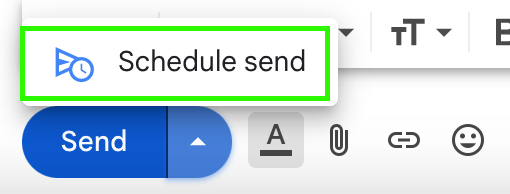
Finally, input the date and time you want the email to be sent, and click the schedule button! Other email applications may require you to right click on the send option and select “Schedule Send”. Alternatively, if you are on mobile, you may need to tap and hold on the send option and then select “Schedule Send”.



 The H.A.C.K.E.R. Project
Leave a comment