
Have you ever received a text message about a package being stuck at a shipping facility due to incorrect information? Or, have you ever received a text supposedly from a bank saying that your account information needs updated immediately? If so, you have likely received a smishing attempt. Smishing is a type of phishing scam that primarily utilizes SMS messaging, or, in other words, text messages, to deliver attacks. Victims of a smishing scam “will typically receive a deceptive text message that is intended to lure the recipient into providing their personal or financial information. These scammers often attempt to disguise themselves as a government agency, bank, or other company to lend legitimacy to their claims” (USPIS). Thus, smishing scams can be considered a form of social engineering, just like phishing. The below image is an example of a smishing attempt:
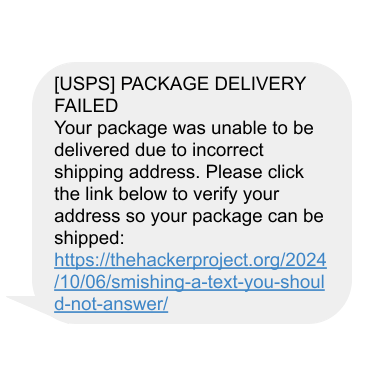
The below videos by the USPIS give a brief overview of smishing, showcase example smishing texts, and cover the main forms of smishing:
A Scam on the Rise
Unfortunately, smishing schemes are rather common, and will likely continue to ramp up as the end-of-year holiday season begins. One reason that smishing has become more common is that, in some cases, it can be more effective than a standard phishing email; “the hackers perpetrating these attacks, sometimes called ‘smishers’, know that victims are likelier to click text messages than other links. At the same time, advances in spam filters have made it harder for other forms of phishing, like emails and phone calls, to reach their targets” (Kosinski). Not only that, but text messages nowadays are the primary or preferred form of communication for some as opposed to phone calls or emails, which makes smishing an even more attractive scam option.
Additionally, it can be easier to hide who exactly is sending the smishing texts in the first place. There are multiple methods that allow smishers to “mask the origins of smishing messages”, including “tactics such as spoofing phone numbers with burner phones or using software to send texts by email” (Kosinski). Phone number spoofing is, essentially, a way to disguise your phone number by making it look like someone else’s phone number. For example, say Gus wanted to send a smishing text to Heidi, but did not want his phone number revealed. Gus could use a spoofing tool to make it look like the smishing text actually came from Isaac’s phone number.
Finally, another advantage that hackers enjoy by sending smishing texts is that it is “harder to spot dangerous links on cell phones. On a computer, users can hover over a link to see where it leads. On smartphones, they don’t have that option. People are also used to banks and brands contacting them over SMS and receiving shortened URLs in text messages” (Kosinski). While it is true that one can attempt to copy and paste the message and link from the text in order to find out where exactly the link leads, this can pose the risk of accidentally opening the link. Not only that, but some people may not think twice about clicking a link that has been sent to them via text message, especially if they are used to receiving links to social media posts from friends or acquaintances. For example, the Look Who Died scam is a form of smishing that involved messaging users through social media through compromised or cloned accounts (a cloned social media account is an account created to mimic another person’s social media).
What Happens if You Fall for the Scam?
In many cases, a smishing scam is meant to collect your personal information. If you click on the link, it will most likely take you to a webpage that will ask for personal and/or financial information under the context of the message (Dhaliwal). For example, if the smishing text claimed to be from customs regarding a package being shipped to you, the webpage will likely mimic that of a shipping website, or if the smishing text claimed to be a bank and stated your account was frozen, the webpage may resemble the bank’s actual log in screen. Regardless of how the form looks, once you fill it out with your information, “the scammer can then exploit that info for financial gain” (Dhaliwal). They may demand ransom for your information, attempt to blackmail you, outright sell your data to someone else, or even try to impersonate you. Never enter your personal information onto a form that you accessed through a strange or suspicious link and exit the webpage immediately.
Unfortunately, stealing your personal information is not the only purpose that smishing can serve, as simply clicking on the link can be dangerous. In some cases, users who clicked on a smishing link “were led to a domain that did nothing but infect their browser or phone with malware” (Dhaliwal). Thus, it is not safe to click on the link as it can put your device at risk by directing you to a malicious website. Some smishing schemes may even attempt both goals by sending you to a malicious website that not only attempts to install malware on your device, but also prompts you for your personal information. Thus, if you did click on the link, it is recommended to install an antivirus or anti-malware software.
United States Postal Service “Package Delivery”
One of the most common types of smishing scheme involves the victim receiving a message regarding a package in transit. The text may claim that the package is being held at customs and needs verification before it can be released, that the package could not be shipped due to incorrect information, or may simply claim to be the tracking link for the package. If you are not expecting any sort of package, this may already make you suspicious, but as the end-of-year and even the beginning-of-year holidays approach, it becomes much more likely that you are waiting on something to arrive. Thus, the smisher hopes that you “might mistake the smishing attack for a proper message. Scammers make them look and sound legit, posing as the U.S. Postal Service or other carriers like UPS, DHL, and FedEx” (Dhaliwal).
First and foremost, if “you never signed up for a USPS tracking request for a specific package”, are not waiting for a package, or are suspicious of the message you received, “then don’t click the link” (USPIS)! The below video by the USPIS discusses smishing that takes the form of postal service texts:
Additionally, the USPIS stated the following regarding smishing texts that pretend to be from the USPS:
The Postal Service offers free tools to track specific packages, but customers are required to either register online, or initiate a text message, and provide a tracking number. USPS does not charge for these services! USPS will not send customers text messages or e-mails without a customer first requesting the service with a tracking number, and it will NOT contain a link. So, if you did not initiate the tracking request for a specific package directly from USPS and it contains a link: don’t click the link!
If you suspect the text message you have received is suspicious but are expecting a parcel, please do not click on any links. Rather, report it and visit USPS.com from your mobile device or computer for tracking and additional resources.
USPIS
How to Stay Safe
One way that you can stay safe when it comes to smishing texts is knowing how to spot one. While many of the same tips for spotting phishing emails can be useful, smishing texts are somewhat different. If the text message tries to convey a sense of urgency, contains spelling or grammatical errors, comes from an unknown number, and contains a link, then it is best to approach with caution, as it may be a smishing scam. As stated by Dhaliwal,“[i]nstead of clicking on a link within the text, it’s best to go straight to the organization’s website to check on your delivery status or contact customer service”. That way, you know for certain that you are on a legitimate website and are not being fooled by a smishing scam.
Fortunately, both “Android and iOS operating systems have built-in protections and functions, like blocking unapproved apps and filtering suspicious texts to a spam folder”, which you can utilize to reduce the amount of smishing messages you receive and possibly prevent you from falling for one by accident (Kosinski). Make sure to enable these features that filter out suspicious messages or those from unknown numbers to stay safe.
If you receive a message that you suspect to be a smishing attempt, it is best to delete it. Additionally, the USPIS requests that you report any smishing attempts so that they can be investigated:
To report USPS related smishing, send an email to spam@uspis.gov.
Without clicking on the web link, copy the body of the suspicious text message and paste into a new email.
Provide your name in the email, and also attach a screenshot of the text message showing the phone number of the sender and the date sent.
Include any relevant details in your email, for example: if you clicked the link, if you lost money, if you provided any personal information, or if you experienced any impacts to your credit or person.
The Postal Inspection Service will contact you if more information is needed.
Forward the smishing/text message to 7726 (this will assist with reporting the scam phone number).
USPIS
Resources & Further Reading
Dhaliwal, Jasdev. “How Not to Fall for Smishing Scams | McAfee Blog.” McAfee Blog, McAfee, 14 Aug. 2024, www.mcafee.com/blogs/internet-security/special-delivery-dont-fall-for-the-usps-smishing-scam/.
Kosinski, Matthew. “What Is Smishing (SMS Phishing)?” Www.ibm.com, IBM, 10 June 2024, www.ibm.com/topics/smishing.
United States Postal Inspection Service (USPIS). “Smishing: Package Tracking Text Scams – USPIS.” United States Postal Inspection Service, United States Government, 26 June 2024, www.uspis.gov/news/scam-article/smishing-package-tracking-text-scams.



 The H.A.C.K.E.R. Project
Leave a comment